unixwiz anything dealing with *NIX or what ever I want to write about

15Nov/10Off

30 minutes with Solaris 11 Express

Havn't really posted anything Solaris / Unix related in a while, but Oracle gave me a reason to do so today. They released Solaris 11 Express today. So like any "Sun Geek" I downloaded all the different installers; text, automated, live cd, and the full ips package stuff. First up on the install was the text based installer. Needless to say if you are used to the old Solaris text based installer, this one is almost 100% different. The colors are different, there is next to no customization of the install (you can't do any network config other than auto(dhcp) or none), can't pick what Filesystem you will use for root (glad I started doing all zfs roots a couple of months back.)

Some of the things I have noticed:

1. Sudo is now installed, and the first user you create (during the install) is automatically given full "root" access via sudo.

2. Seems all of the commands that were in /usr/sfw/bin are now in /usr/bin with symlinks in /usr/sfw/bin

3. There is a new /usr/gnu structure that has a lot of the GNU based commads, one cool thing [date "+%s"] now works and prints out the date since the EPOCH.

4. $PATH has /usr/gnu/bin:/usr/bin:/usr/sbin:/sbin by default. Which means doing an ls -la looks different than when using the /usr/bin/ls -la. This means it may break scripts ....

5. It seems that when installing in a VMWare environment (I was using Fusion at the moment and will try with ESX later this weekend) that on the first reboot, it will hang indefinitely. You have to do a force reboot or shutdown and restart to get it to "boot"

6. The graphical startup is sort of cool, but it "hides" all the boot messages unless you hit a key to show them

7. cc and gcc are NOT installed by default. :-(

8. showrev doesn't exist any more.

9. Secure by default is enabled

10. IPfilter is enabled by default (no rules though)

that is just a few.. more later.

See the What's New doc for more info and the Release notes.

31May/10Off

VMWare and Sun Gigaswift Ethernet cards

I began setting up my new sun server and san at home the other day.. (Picked up a Sun V20Z and a Sun T3 SAN Disk array very cheap)... Because I am going to be doing some IPv6 testing as well, I installed a Sun Gigaswift (aka Sun's ce, Cassini Ethernet) card in to the machine along with the fibre channel card. I put the VMWare vSphere 4i cd in and went on with the install. But didn't really pay attention that it did not see the CE card, just the two broadcom cards.. So I went ahead any ways thinking I will fix it later. But it seems that there is no drivers on the interweb for the Sun CE card for vmware? If any one knows of a place to get them let me know? Otherwise I will have to find a new card to use in it's place.

28Jan/10Off

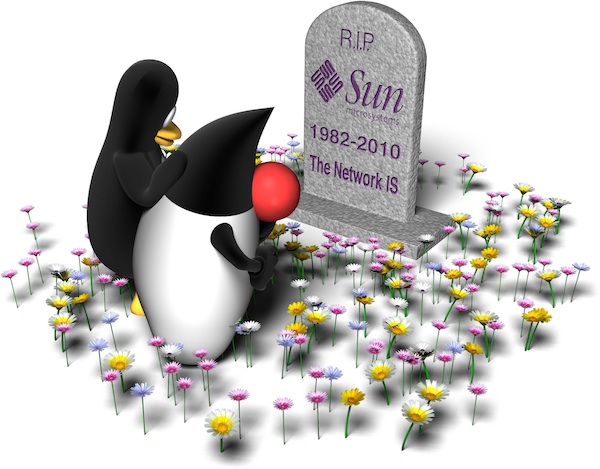
Seeing Red – RIP Sun

Not sure how I feel now that Sun is no longer Sun. Kinda weird watching the Oracle web cast of their purchase of Sun and what is going to happen. One thing I can't understand is they are all wearing badges saying "We're Hiring!". But yet they let go SO many good Sun employees. I just don't think it is going to be the same old Sun that I have used since 1994.

RIP Sun 1982 - 2010

From http://blogs.sun.com/jag/

Tagged as: , , Comments Off
12Jul/09Off

Sun Ray Software 5 Early Access

Started installing the Sun Ray 5 Early Access software tonight. Some things I found so far that weren't where I thought they should have been in the wiki docs:

1. It requires that you have Java 1.6 on the machine. Solaris 10 Update 7 does not come with Java 1.6, so I had to download and install it.

2. It needed apache tomcat installed, this is for the admin gui.

Unfortunately I only got as far as getting it installed. I was testing it in a Solaris VM machine on my Mac, however I was having problems getting it to bind to the second ethernet interface. So that will be for later.

19Dec/08Off

Increase in Solaris patch cluster size

Justin pointed out to me tonight that the new Recommended and Security patch clusters for Solaris 10 were quite large. And right he was.. It seems that in the last month or so the 10 Recommended patch cluster has grown from 400meg to over 1GB in size now. (not to mention that he said you need almost 2.5 gig of space to unzip it.)

Looking at the cluster readme, I can take a guess as to why it is so large, there are multiple kernel patches. There are also updates to Firefox, Thunderbird, Adobe Acrobat Reader, Adobe Flash plugin, multiple Java Updates and a patch for the defunct Mozilla 1.7 browser (which in my opinion should just be removed completely).

The interesting part is that the X86 patch cluster is over 300Meg smaller than the sparc one. The only major difference that I can think of is that X86 doesn't have Adobe Acrobat Reader yet.

I wish Sun would just offer a ISO download of all the patches now (sort of like the EIS dvd) for the public.  Also need to find a faster way to download the patches.