bing has bong’d

Looking through some logs I noticed a bunch of traffic coming from bing.com. Funny thing is, it is NOT people searching for something and my site coming up. It appears that bing is doing keyword searches. For example here is a list of words it has looked for so far this month:

about
adelphia
adobe
airways
cameras
cdrecord
channel
channels
cisco
citrix
clear
client
cloning
comcast
cooking
december
demand
desktop
digital
drive
drives
dtrace
dynamic
dyson
early
error
family
funny
fusion
gravelly+point
hospitals
house
january
jetblue
morgantown
mount
movies
mysql
nikon
october
opensolaris
overcurrent
passwd
password
patch
peanut
photography
photoshop
pictures
ponytail
postgresql
procmail
psrinfo
question
radio
random
replication
restoration
sendmail
server
service
should
solaris
studio
surprise
system
syswatch
table
thomas
tivoli
today
toilet
tomcat
transition
travel
trying
tvgos
update
upgrade
usairways
vacation
vmware
vsphere
weblog

The reason I can tell that it is not a person is that one, the requests are coming from a BOT. The second is that when some one actually uses BING to search for something there is additional stuff “left” on the referrer string. Is bing really that stupid about how it indexes a site? So I guess the point of this is, if you want to have your site on the top of the list with bing, just put a dictionary on your site ;-).

Snow Leopard

I received my copy of Snow Leopard today from Apple. They overnighted it and fedex was kind enough to call and tell me they tried to deliver it but was unable to. I stopped by the Fedex depot on the way home and picked it up. I decided to load it on the Laptop first because I have heard of some problems with Adobe Photoshop Elements (which I run on the Mac Pro desktop).

So what are my thoughts:
1. I think Apple shipped some faulty DVD’s. Everytime I put it in my MacBook Pro, it would try to read it and then it would eject it. I put it in the MacPro desktop and it came right up. So back to the MBP and it continued to just eject it. I then attached an LG External USB DVD drive, and it seemed to have some problems reading it on there. I then did the Apple Software update (there were a couple of Security alerts available) thinking that may help. Didn’t appear to. Then all of the sudden it loaded the installer. After an hour later and 2 reboots Snow Leopard was installed via the USB drive. They still need to work on their installer, it set at the “Time Remaining : Less than a minute” for over 10 minutes.

2. The initial startup seemed to take some time, but have not tried rebooting it yet.

3. The Finder seems extremely faster.

4. It free’d up almost 10 gig of disk space for me. I started the install with only 17gb free. After the install I now have 27.11 gb free.

So far I havn’t tried any of the other apps I use, but Adium X 1.4b9 seems to run well. I also like the new Expose, seems to organize stuff a little better. Will have to see what else has changed.

Comcast Morgantown QAM Update

It seems that comcast is getting ready for the use of those little cable boxes. Rescanned today and found this (all in the clear):
2.1 – KDKA HD
4.1 – WTAE HD
4.2 – this Pittsburgh
5.1 – WDTV HD
7.2601 – WPCW CW Pittsburgh HD
11.1 – WPXI HD
11.2 – Retro TV
13.1 – WQED HD
13.2 – WQED – Create
13.3 – WQED – Neighborhoood
16.1 – WQEX / Shop NBC
18.1 – WVCW CW Clarksburgh
18.6 – WDTV SD
18.7 – WBOY SD
18.8 – WVFX SD
18.9 – WNPB D1
18.10 – Local Government channel (analog 15)
18.11 – Local Channel (analog 3)
20.1 – CSPAN
22.1 – WPMY HD
24.1 – WNPB D1
24.2 – WNPB D2 – Create
24.3 – WNPB HD
40.1 – WPCB – Religous
53.1 – WPGH HD
79.3 – KDKA SD
79.4 – WPGH SD
79.5 – WTAE SD
79.6 – WQED SD
79.7 – WPMY SD
79.8 – WPXI SD
79.9 – WPCW SD
79.10 – Fox Sports Pittsburgh
79.11 – WGN Chicago
85.111 – PPV Barker Channel
86.1316 – Music Choice
90.601 – Current

I am not sure why they decided to put all the locals on Analog, HD and SD. But I have a feeling I know why… I just wish they would make the cartoon network in the clear.

Where is my pool?

I usually love coming home from a business trip. Nothing like my own bed, my own shower, etc… But monday night was something I did not want to come home to. When I pulled in the driveway I could not understand why there was water on the driveway when it hasn’t rained in quite a while. I then looked at the retaining wall next to the driveway and there was a nice little bit of water “falling” over it. Still could not understand where it was coming from as where that water was the only thing there was the gutter drain, and it hasn’t rained.. So I then look up in my yard and what do I see a little 3 to 4 inch water fountain coming out of the ground. The ground had risen about 3 to 4 inches around where the water was and made a nice little hump. Oh SHIT…. I immediately ran up and shut off the main water valve at the water meter. The water fountain goes away and the hump goes down… Oh shit my water line has broke….

So I called MUB and they were like “Sorry if it is between the meter and your house it is your own problem.” Freaking awesome, they place the meter 2 foot from the road and there is like 35 feet between it and the entrance to my house. So I grab the shovel and start digging and digging and digging. One thing about a water leak, it sort of tells you where it is at by where the fountain was. So after a while a friend from work and his dad and my parents show up.. My friend and I continue digging. All the time thinking that the line we are looking for is a metal line, because it is metal at the meter and metal in the house.. But NO for some stupid ass reason they put converters on it and converted it to 3/4 inch PLASTIC. So we keep digging and then turn the water on a little to have it “clear” the way so we can see where the line is. Finally after about an hour we find the pipe. It has about a 1 inch slice in it.

Now it is 5 minutes till 9PM, haven’t eaten yet, been on the road for 5 hours and now I am realizing I am not getting any water this evening. My mom tries to make a dash for Lowes to get parts, but they are closed by the time she gets there. So I grab the 15 gallons of water my parents brought down and try to clean up some.

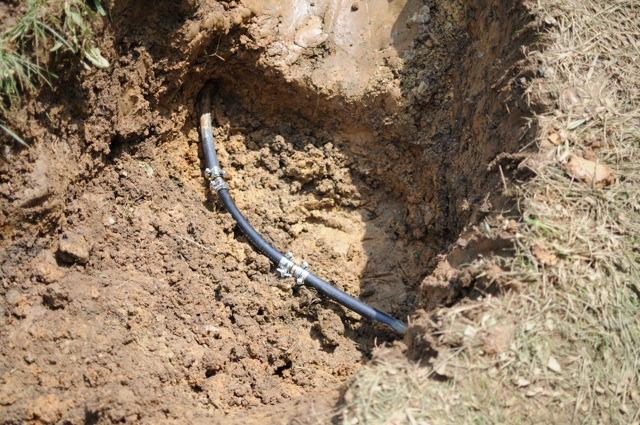
Fast forward to Tuesday morning I make a dash to Lowes as soon as they open. “We are sorry, we don’t sell the stuff to fix your pipe”. WTF, you are a home improvement store but you don’t sell stuff to fix pipe even though you sell the pipe? So off to Hugarts, this is one of those places where if they don’t have it, more than likly you don’t need it in the first place. With parts in hand I head home to fix the pipe. If you have never worked on 3/4 inch water supply line that is plastic, (this being my first time), it was a chore. Luckly the piece I cut fit the bend perfectly that was already there. But the hard part was putting the joiners in and getting everything tight. So here is what it looked like when I was done:
pipe
Not sure if you can tell from the pic, but this was just over 2 foot under ground. So with the pipe fixed it is time to fire it up, turned the water on and everything seems fine.

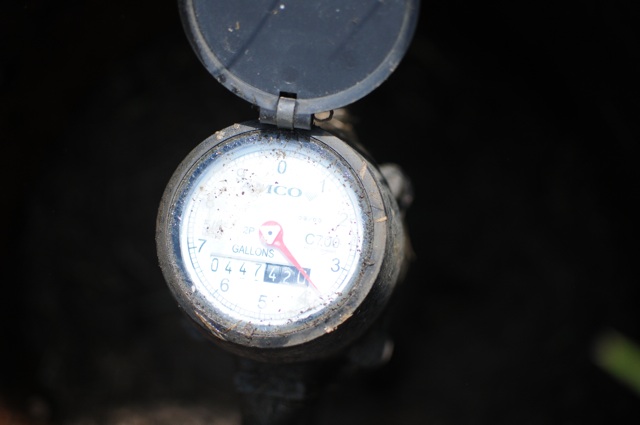
Now was the time to try and figure out how much water had actually came out during the little problem. I looked at the meter and all I saw was this:
meter

So doesn’t tell me too much as I don’t know how they read the meters. (I say this because on my last water bill all it said was 287 was the meter reading). So I called MUB and they said they would come out some time before 3 tomorrow (Wednesday) and do a meter reading. I could not fill the dirt back in because they had to “verify” that my line did break.

So MUB shows up today and I go out to talk with the guy. I asked him what they were actually reading when they read the meter. Short answer the first 3 digits. So I thought to my self oh shit… See the current reading was 447,420. When my meter was last read (6.1.09) the first 3 digits was 287. So that tells me that between 6.1.09 and today there has been 160,000 gallons of water go through my meter. As a prospective, my bill (based on 3 months) is usually only 6,000 gallons. So 160,000 gallons is enough for me for 6 years. This is when I told the guy, “damn that is a lot of water, wish I had a pool to put it in.” He sort of laughed and said that is more water than goes in to a pool. (So I looked it up, 160,000 gallons of water is equivalent to 27 foot cube. That is a metric fuck-ton of water, to quote a DefCon goon….)

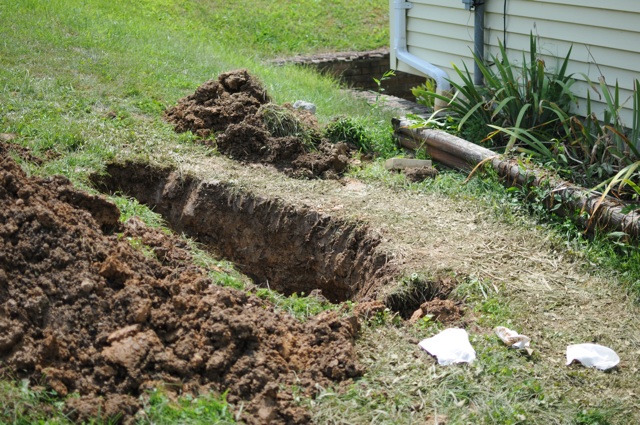
So the MUB guy leaves and now I start filling in the hole, thinking to my self how am I going to pay for the equivalent of 6 years of water and sewage. Here is the coffin I mean ditch that I had to start filling in:
ditch
It got to the point it was too hot and I pissed off some yellow jackets so I went in side and waited a couple of hours. Went back and finished filling it in and it now looks almost like it did before I started:
after

So now I have to call MUB tomorrow to see what they are going to do. Hopefully I can get a waiver, as there was no way to tell the line was broke until the fountain sprouted. I guess I could go out side and read the meter every day, but who does that?

So leads me to the title. I wish I would have at least had a pool to put all that water end, at least I could have enjoyed it, rather then digging through the mud and clay for 4 hours.

OpenVPN between Solaris and MacOSX

I decided to see if I could get a VPN connection working between my laptop (running MacOSX) and my home server running Solaris 10. It turned out to be pretty easy to do a simple config. I am using OpenVPN. To compile the software on my Solaris box I needed to download 3 items:

  1. Virtual Point-to-Point (Tun) and Ethernet (TAP) devices driver. I got the version 1.1 from http://vtun.sourceforge.net/tun/ in source code form.
  2. LZO version 1.08 compression software from : http://www.oberhumer.com/opensource/lzo/download/LZO-v1/
  3. OpenVPN software, I am using the version 2.1RC because I wanted the version to match what I am going to run on the Mac. It can be downloaded from http://openvpn.net/index.php/open-source/downloads.html

Once I got everything downloaded, just compile the LZO, Tun, and OpenVPN:
I decided to have everything related to the vpn installed in /opt/vpn. One thing to note, I tried using the new version 2.x of LZO, and OpenVPN would not find it, so I had to use Version 1 even though 2 is supposed to be supported. So I did the following to compile LZO:

gzip -d lzo-1.08.tar.gz
tar -xvf lzo-1.08.tar
cd lzo-1.08
./configure --prefix=/opt/vpn/lzo
make
sudo make install

Next was to compile TUN

gzip -d tun-1.1.tar
tar -xvf tun-1.1.tar
cd tun-1.1
./configure --prefix=/opt/vpn/tun
make
sudo make install

Only issue with tun was that it did not use the –prefix, it puts everything where it needs to be in /usr/kernel/drv on solaris.

Next is openvpn:

gzip -d openvpn-2.1_rc19.tar.gz
tar -xvf openvpn-2.1_rc19.tar
cd openvpn-2.1_rc19
./configure --prefix=/opt/vpn/openvpn --with-lzo-headers=/opt/vpn/lzo/include --with-lzo-lib=/opt/vpn/lzo/lib
make
sudo make install

Once that is installed I did the simple 1 to 1 vpn connection (static key) for just testing to see if it would work. So in the /opt/vpn/openvpn/sbin directory I did this:

cd /opt/vpn/openvpn/sbin
./openvpn --genkey --secret static.key

I then copy that key to my client via some “secure” means

Then created a server.conf that looks like this:

dev tun
ifconfig 10.8.0.1 10.8.0.2
secret static.key
cipher AES-256-CBC
keepalive 10 120

On my client (MacOSX) I downloaded Tunnelblick from http://code.google.com/p/tunnelblick/downloads/list and installed it. Next I copied that static.key from the server to the client and put it in ~/Library/openvpn. I also created a openvpn.conf in that directory that looked like this:

remote a.b.c.d
dev tun
ifconfig 10.8.0.2 10.8.0.1
secret static.key
cipher AES-256-CBC
route 10.0.0.0 255.255.255.0

In the above, a.b.c.d represents my public IP address for my solaris server.

Now when you start tunnelblick it will search that directory and find that config file and ask if you want to load it. But we are not quite ready to start yet. The next thing I had to do was forward port 1194 UDP off of my router to my OpenVPN server. I will leave this exercise to you. You will also need to make sure IP forwarding is enabled on the Solaris 10 server (because I only have 1 network card in it, but “two” different networks on the box. IP Forwarding will allow your remote machine to be able to see your local network. And since my OpenVPN server is not the router for the entire network, I had to add a static route on my router to say that 10.8.0.0 is available via the openvpn servers local network address, I.e. 10.0.0.1.

You should be able to start the openvpn server now:

/opt/vpn/openvpn/sbin/openvpn server.conf

Once it is started you can use tunnelblick to connect. Once you are connected, you should see that is is connected and the icon has changed from this:
Picture 3
to look like this:
Picture 2

You should also see a tun0 device show up:

ifconfig tun0
tun0: flags=8851 < up ,POINTOPOINT,RUNNING,SIMPLEX,MULTICAST > mtu 1500
	inet 10.8.0.2 --> 10.8.0.1 netmask 0xffffffff 
	open (pid 608)

You should now be able to see all your hosts on the “remote” network. Next up I am going to work on doing the pki infrastructure so I can hopefully link other clients both static and dynamic.

This make is really nice to be able to see your “home” network while you are away.